
Logical Builder allows you to save a project on the server, enabling multiple developers to collaborate on the same model. A saved project is stored centrally and can be opened by any user with the appropriate permissions.
Note: A saved project is not published. It will not appear in the published projects list and is not accessible to end users until explicitly published. For information on how to make a project available to users, refer to the Publishing a project documentation.
How to save a project
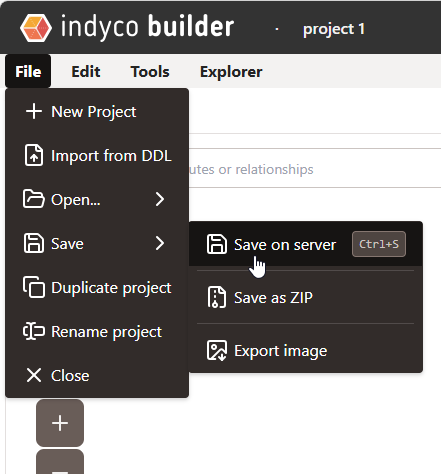
To save the current project, open the File menu in the toolbar and select Save -> Save on server or use the shortcut Ctrl + S. The current version of the project will be stored on the server, overwriting the previously saved version.
Note: The save operation does not perform a merge between the base version and the modified version. The last saved version is always the one that takes effect.
Concurrent editing warning
If another user has modified and saved the project after you opened it, attempting to save your version will trigger a warning and the operation will be interrupted. In this case, you will need to re-open the project to obtain the latest version before proceeding with your edits.
Local save options
In addition to server-side saving, the following local options remain available at any time from the File menu:
- Save as ZIP: exports the project as a ZIP archive to your local machine.
- Export as image: saves a screenshot of the current model view, useful for including the diagram in external documents.